Journey Mapping

Customer Journey Mapping, Mapping the Customer Journey, Customer Journey Map, Journey Map, Customer Journey Map, Customer Journey Mapping
Journey Mapping visualises all the steps, touchpoints and emotions a customer goes through whilst interacting with your company. It helps to identify pain points and improve the experience.

What is Journey Mapping?

Journey Mapping is a visual representation of all the steps, touchpoints, emotions and decisions a customer goes through whilst interacting with your company. From initial exploration through to purchase and after-sales care, you map out what your customer encounters, how they feel, and where frustration or trust arises. For small and medium-sized companies, this provides a clear overview of where customers drop out, which moments work particularly well, and where small improvements can have a major impact on conversion or customer satisfaction.

How Journey Mapping works in practice

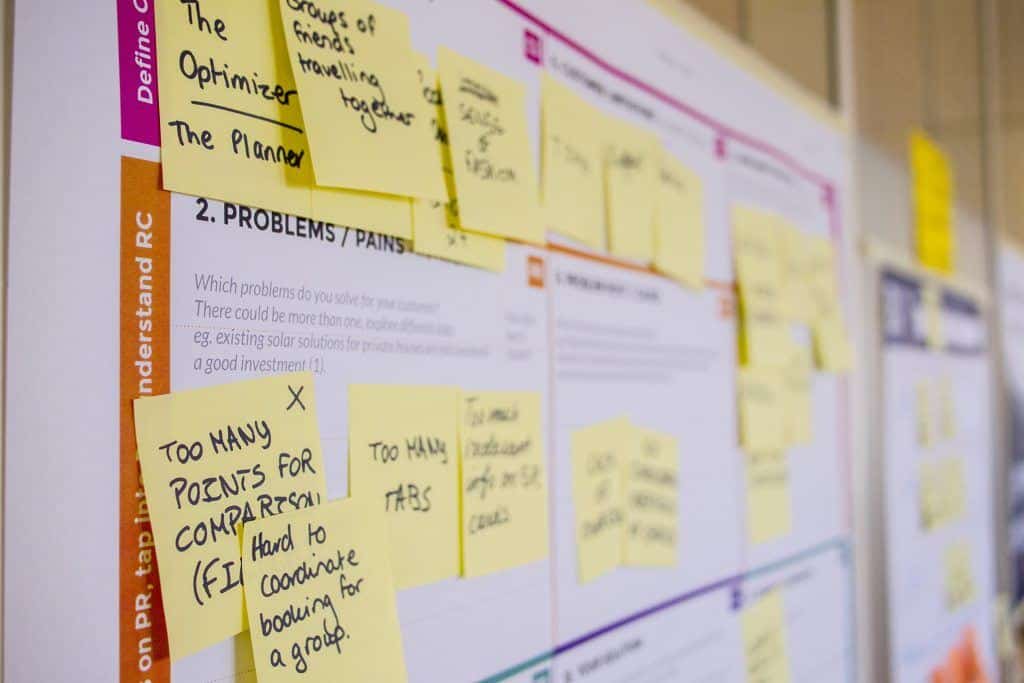
You start by selecting a specific customer type or persona, for example a B2B buyer or an online consumer ordering a product for the first time. You then map out the stages this customer goes through: awareness, orientation, comparison, purchase, use and, where applicable, repeat purchase. For each stage, you note down all touchpoints, such as website visits, telephone calls, email contact or product use. Alongside the actual steps, you record what the customer is thinking and feeling at that moment, and any questions or doubts they may have. Many teams work with a timeline on paper or in a digital tool such as Figma or Miro, using post-it notes or icons to highlight emotions and pain points. This creates a visual narrative that everyone in the team can understand.

Why Journey Mapping came about and why it matters today

Journey Mapping arose from the need to work in a customer-centric way rather than based on internal processes. Companies noticed that customer experiences were often spread across multiple departments: marketing, sales, customer service and logistics each operated from their own perspective. By capturing the entire journey in a single overview, gaps suddenly became apparent – for example, a warm lead follow-up that stops after handover to sales, or an online shop that fails to send a confirmation email. Today, Journey Mapping is relevant because customers are using more and more channels and expect the experience to be seamless. A customer might start on Instagram, ring for advice, place an order online and expect the same information and service at every stage. Journey Mapping helps you understand and improve this complexity.

What Journey Mapping offers small and medium-sized companies

A Journey Map allows you to see exactly where customers drop out, which questions remain unanswered, and where you can achieve significant gains with minor adjustments. For example, an online shop might discover that customers have second thoughts about delivery charges just before payment, or a consultancy firm might realise that prospects receive no feedback after requesting a quote and consequently go elsewhere. By linking these insights to a well-thought-out SEO strategy and clear calls to action on your website, you improve not only the customer experience but also your conversion rate. Journey Mapping does not produce a one-off report but a working document that you can use when designing new services, updating your website or training your team. It makes customer-centricity tangible and measurable.


Applications of Journey Mapping

You use Journey Mapping when you want to understand how customers really experience your company, where they get stuck, and which moments you can improve. It works for new product launches, redesigning your website, optimisation of your sales process or training of customer service staff. Below are four specific situations in which small and medium-sized companies use Journey Mapping and the benefits it delivers.

Improving online shop conversion by identifying bottlenecks

An online shop with 800 products noticed that visitors were viewing product pages but placing very few orders. By creating a Journey Map from orientation to checkout, the team saw that customers were unsure about returns policies and that delivery charges were only visible at the final step. By placing returns information prominently on product pages and displaying delivery charges earlier, the conversion rate increased by 18 per cent. In this case, journey mapping not only helped to identify bottlenecks but also to prioritise the changes with the greatest impact. You can combine these kinds of insights with a professional online shop design that takes customer behaviour and conversion optimisation into account right from the start.

Shortening the B2B sales process through insight into decision-making

A consultancy firm with twelve employees wanted to know why prospects took so long to make a decision after receiving a quote. The Journey Map revealed that, following the meeting, clients were not given an overview of the next steps, did not receive any references and could not see a clear timeline. By sending an automated follow-up email containing case studies, a schedule and a contact person, the agency reduced the decision-making time by an average of three weeks. Journey Mapping revealed that the problem lay not in the quote itself, but in the period that followed. You can support this kind of process improvement with smart marketing automation that delivers relevant information at the right time.

Training customer service staff using real customer experiences

A technical installation company used Journey Mapping to show service staff what customers experience when a fault occurs. The map revealed that, after reporting a fault, customers felt uncertain about when the engineer would arrive and how much it would cost. By training service staff to provide immediate confirmation, a time estimate and a cost estimate, customer satisfaction improved noticeably. In this case, Journey Mapping served as training material: staff could literally see where their communication made a difference. This works particularly well when you create the map together with the team, so that everyone feels a sense of ownership.

When Journey Mapping is the right choice and when it isn’t

Journey Mapping works when you have a clear customer profile, manage multiple touchpoints and want to know where the experience is falling short. It is less suitable if you do not yet have any customers, if your process is so simple that it consists of a single step, or if your team is not prepared to implement changes based on the insights. Journey Mapping takes time and requires honest input from staff and customers. If you do not intend to use the results, invest first in basic data such as web analytics or customer feedback. Journey Mapping is most effective when you are prepared to adapt processes, communication or your website based on what you discover.

Want to apply this in your company? Monkey Vision helps SME entrepreneurs with web design, SEO and smart digital solutions. Plan a no-obligation discovery call and discover what is possible for you.

Plan a discovery call

Frequently asked questions

No, Journey Mapping goes beyond simply describing the steps. You also visualise emotions, pain points, questions and decision moments for each phase. You can describe a customer journey in text, but Journey Mapping uses a visual timeline in which you highlight touchpoints, feelings and areas for improvement. This allows you to see at a glance where customers get stuck or drop out. The difference lies in the depth and practicality: you actively use a Journey Map to improve processes, adapt communication or redesign your website. A description often remains just a document, whereas a Journey Map becomes a working document that teams use together to work in a more customer-focused way.

You use Journey Mapping to map out the entire experience across multiple touchpoints, and user testing to test specific interactions on your website or app. If you want to know why customers drop out between the exploration and purchase stages, choose Journey Mapping. If you want to see whether a new checkout flow works, choose user testing. You’ll often combine both: first, you map the journey to identify pain points, then you test improvements with real users. For small and medium-sized companies with limited time, journey mapping is a good starting point because it provides an overview and helps set priorities. You can add user testing when you want to validate specific changes before implementing them.

Start with one specific customer type and one concrete journey, for example, a new customer requesting a quote. Gather input from colleagues who have customer contact: sales, service, administration. Draw a timeline on a whiteboard or in a tool such as Miro, and note down for each phase which steps the customer takes, what questions arise and where frustration occurs. Use Post-it notes for touchpoints and emotions, so you can easily rearrange them. Then ask a few customers for feedback: does this picture match their experience, or are we missing anything? You don’t need to get it perfect from the start; an 80 per cent complete first version already provides enough insight to prioritise improvements. Journey mapping isn’t a one-off project but a living document that you update as you learn more.

The biggest pitfall is creating a nice map but doing nothing with it. Journey mapping takes time and input from several people, so make sure you agree in advance on which improvements you’re going to implement. A second pitfall is remaining too general: a map for ‘all customers’ yields few sharp insights. Choose one specific customer type or journey. A third risk is that you only brainstorm internally without any real customer input. Validate your assumptions using data from web analytics, interviews or surveys. Journey mapping works best as a living document that you use during team meetings, website updates or process improvements, not as a one-off report that ends up in a drawer.

The best first step depends on where you are right now. Do you want to know where customers are dropping out or how you can improve the experience? Then book a free 30-minute UX scan with Monkey Vision. We’ll walk you through your current customer journey in real time, highlight pain points and suggest three concrete areas for improvement that you can tackle this month. You’ll receive an honest assessment of the impact on conversion and customer satisfaction, with no sales pitch. Want to find out more? Take a look at our approach to website development or get in touch straight away to book an appointment.

About the author

Monkey Vision

Monkey Vision is a full-service digital agency based in London, specialising in web design agency, SEO and AI automation for SMEs. The knowledge base is compiled by our team of online strategists and continuously updated based on current insights.

Publication date: 26-04-2026
Last update: 26-04-2026